
css
CSS keyframes
.selector {
-webkit-animation-delay: .4s;
	animation-delay: .4s;
	-webkit-animation-duration: .6s;
	animation-duration: .6s;
	-webkit-animation-fill-mode: both;
	animation-fill-mode: both;
	-webkit-animation-name: **keyframe-name**;
	animation-name: **keyframe-name**;
}
@keyframes  **keyframe-name** {
		0% {
				opacity: 0;
				-webkit-transform: translate3d(-100%, 0, 0);
				transform: translate3d(-100%, 0, 0);
*****other initial styles*****
		}
		100% {
opacity: 1;ol {
padding-left: "X"px;
list-style-position: outside;
}You may need to apply list-style-position: outside to <li>
Bootstrap 3
Flex-Box: Good references
MS - FLEX
  display: -webkit-box;
  display: -moz-box;
  display: -ms-flexbox;
  display: -webkit-flex;
  display: flex;
  -webkit-box-pack: center;
  -moz-box-pack: center;
  -ms-flex-pack: center;
  -webkit-justify-content: center;
  justify-content: center;
  -webkit-box-align: center;
  -moz-box-align: center;
  -ms-flex-align: center;
  -webkit-align-items: center;
  align-items: center;
}
CSS Filters
/*Filter styles*/
.saturate {-webkit-filter: saturate(3); filter: saturate(3);}
.grayscale {-webkit-filter: grayscale(100%); filter: grayscale(100%);}
.contrast {-webkit-filter: contrast(160%); filter: contrast(160%);}
.brightness {-webkit-filter: brightness(0.25); filter: brightness(0.25);}
.blur {-webkit-filter: blur(3px); filter: blur(3px);}
.invert {-webkit-filter: invert(100%); filter: invert(100%);}
.sepia {-webkit-filter: sepia(100%); filter: sepia(100%);}Fontawesome: Fixed Width Icons
Use fa-fw to set icons at a fixed width. Great to use when different icon widths throw off alignment. Especially useful in things like nav lists & list groups.
How to apply specific CSS rules to Chrome only?
CSS Solution
from https://jeffclayton.wordpress.com/2015/08/10/1279/
/* Chrome, Safari, AND NOW ALSO the Edge Browser and Firefox */
@media and (-webkit-min-device-pixel-ratio:0) {
  div{top:10;}
}
/* Chrome 29+ */
@media screen and (-webkit-min-device-pixel-ratio:0)
  and (min-resolution:.001dpcm) {
    div{top:0;}
}
How To Center an Object Exactly In The Center
BY CHRIS COYIER ON NOVEMBER 14, 2007
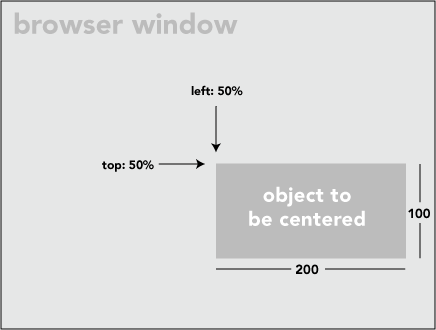
.centered {
  position: fixed; /* or absolute */
  top: 50%;
  left: 50%;
}
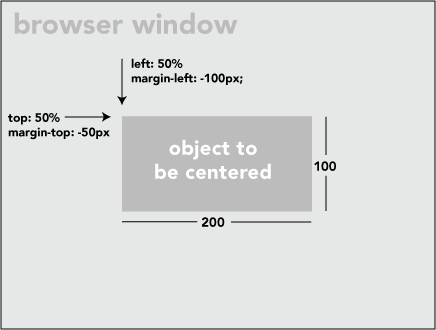
In order to get the image exactly centered:
.centered {
  position: fixed;
  top: 50%;
  left: 50%;
  margin-top: -50px;
  margin-left: -100px;
}